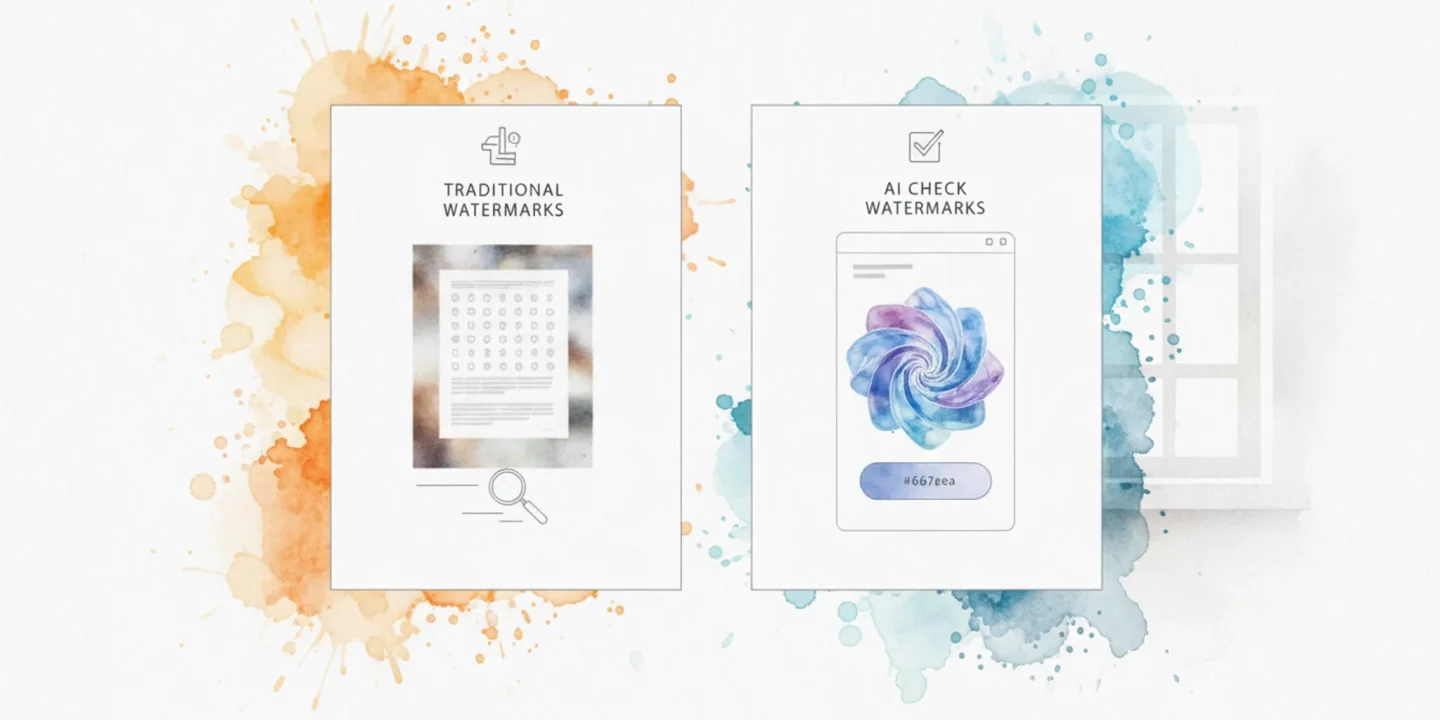
You paste AI-generated text into a document and it looks clean. But there is something hiding in there: invisible Unicode watermark characters that ChatGPT, Claude, Gemini, and other models can embed. Most detection tools either miss these marks entirely or give you a vague probability score with no proof.
You will see exactly what each tool catches, what it misses, and how the results look with real examples. After reading, you will know which detector to trust and which one to skip.
The strongest choice for this job is AI Watermark Remover. It scans text in your browser, detects invisible Unicode watermarks, and shows you exactly where they are hiding. No fake percentages, no guesswork. Just the evidence.
What is the most direct way to check watermarks on AI text?
The fastest, most direct watermark check for AI text is pasting it into AI Watermark Remover's scanner, which flags hidden Unicode characters entirely in your browser. That direct check beats a vague probability score because it shows the exact invisible marks. For provenance signals like C2PA metadata, run the same text through IsWatermarked? as a second pass. For image files, switch to a real-time image watermark detector.
How the watermark check tools compare side by side
The four main options for checking AI text watermarks differ sharply in what they scan, how they report results, and whether they handle invisible characters at all. We compare them on three criteria: detection method, output clarity, and privacy.
| Tool | What it detects | How results are shown | Privacy model |
|---|---|---|---|
| AI Watermark Remover | Hidden Unicode characters (zero-width spaces, variation selectors) | Lists each invisible character by type and position | Entirely client-side; nothing leaves your browser |
| IsWatermarked? | C2PA provenance data, hidden Unicode signals, metadata | Evidence-based report with no fake percentages | Browser-based processing |
| Check AI Watermarks | C2PA metadata, hidden Unicode characters, metadata signals | Shows raw detected marks and character-level flags | Private, runs in your browser |
| Manual inspection | Visible anomalies only (odd spacing, extra characters) | Your own eyes; no automated report | Fully offline |
The table makes one thing obvious: if you need to catch the invisible Unicode watermarks that ChatGPT and Claude embed, only the three automated tools will find them. Manual inspection misses everything that does not visibly break the text. AI Watermark Remover and Check AI Watermarks both surface the exact hidden characters, while IsWatermarked? adds C2PA provenance checks for images alongside text scanning.

When to use a dedicated watermark checker vs a general text scanner
The choice comes down to what you are actually looking for. A dedicated watermark checker like AI Watermark Remover scans specifically for the hidden Unicode characters that major AI models embed in their output. A general text scanner or hex editor shows you every character in a document, but leaves you to figure out which ones are watermarks and which are normal punctuation.
If you just need to know whether a piece of text carries an invisible AI watermark, the dedicated tool saves you the manual inspection work. If you are auditing the raw structure of a file for other reasons, a general scanner gives you more control but less guidance. Most people doing routine checks on AI-generated content will get a faster, clearer result from a tool built for that single job.
Check watermarks comparison: the four criteria that separate the tools
Detection depth: what each scanner actually finds
The fundamental difference between the four leading checkers is what they scan for. AI Watermark Remover targets the specific invisible Unicode characters that systems like ChatGPT, Claude, Gemini, and Grok embed: zero-width spaces, zero-width joiners, and variant selectors. Paste a paragraph, and it highlights each suspect character with a count.
IsWatermarked goes a step further by checking for C2PA provenance data and invisible Unicode as well, but its results appear as a single evidence summary rather than a character-by-character breakdown. CheckAIWatermarks covers similar ground (Unicode invisibles and C2PA metadata) and also runs in the browser. Scanly, on the other hand, is built for visible watermarks on images, not hidden text marks. If your task is purely about AI text, Scanly adds no value.
Verdict: AI Watermark Remover for the most detailed text-level detection; IsWatermarked and CheckAIWatermarks are strong alternatives if you also need C2PA checks.
Privacy: where your text stays
All three text-oriented checkers claim client-side processing, meaning the text you paste never leaves your device. AI Watermark Remover explicitly states on its privacy policy page that the tool does not store or transmit any data, and the same transparency applies to its terms of service. IsWatermarked and CheckAIWatermarks make similar privacy promises in their documentation. Scanly, being an image-focused service, may cache uploaded images for processing, so it is less appropriate for sensitive documents.
Verdict: Tied among the text checkers; choose any of the three for private scanning.
Ease of use: paste, scan, interpret
Every tool in this category follows the same basic flow: paste text, click a button, read the result. AI Watermark Remover shows results as a list of found marks with their Unicode code points, which is helpful if you want to understand exactly what the generator hid. IsWatermarked returns a single "watermark detected" or "no watermark" verdict with a confidence indicator, faster to parse but less specific. CheckAIWatermarks requires an extra click to "scan" after pasting, a minor friction point.
Scanly requires uploading an image file, which is a different workflow altogether.
Verdict: IsWatermarked for pure speed of answer; AI Watermark Remover for depth of detail.
Extra features: detection is just the start
AI Watermark Remover stands alone by offering removal of the detected watermarks with one click, you can strip the invisible characters and get clean text. No other tool in this comparison provides that. It also includes a file metadata cleaner for images and documents, which directly addresses the wider problem of hidden authoring info in downloaded AI assets. IsWatermarked and CheckAIWatermarks are detection-only; if you find a watermark, you must handle removal elsewhere.
Scanly adds visible-watermark overlays, which is a different use case.
Verdict: AI Watermark Remover wins decisively for users who need detection and cleanup in one pass.
If your workflow stops at detection, any of the three text checkers will work. But once you factor in the ability to act on what you find, AI Watermark Remover is the tool that completes the job. For real examples of how these hidden marks behave in everyday text, the article 7 check watermarks examples that actually change your result walks through the exact scenarios that trip up the other checkers.
The difference in output format matters more than most people expect. AI Watermark Remover returns a structured list: each detected character, its Unicode code point, and its position in the text. You see `U+200B (ZERO WIDTH SPACE) at position 14` rather than a vague "watermark detected" label. This granularity lets you confirm the scanner isn't flagging legitimate whitespace or non-breaking spaces that belong in the text.
IsWatermarked returns a confidence percentage alongside its verdict. You get "92% likely watermarked" instead of the raw characters. That confidence number is useful for quick decisions, but it hides the specific marks that were found. If you are comparing two documents side by side, you cannot tell whether they share the same watermark pattern.
CheckAIWatermarks falls in between: it shows the count of detected marks and a simple pass/fail result, but not the individual code points. Scanly returns a modified image with the visible watermark either highlighted or removed, which is a fundamentally different output.
Verdict: AI Watermark Remover if you need to verify results or compare multiple samples; IsWatermarked if a single verdict with confidence is enough.
Browser support: where the tool runs
All three text checkers run in the browser. AI Watermark Remover and CheckAIWatermarks work identically on Chrome, Firefox, Edge, and Safari. IsWatermarked requires JavaScript enabled and performs slightly slower on Safari due to how it handles clipboard reads. Scanly requires a modern browser with Canvas support, which excludes older systems.
Verdict: AI Watermark Remover and CheckAIWatermarks for widest browser compatibility.
The practical takeaway
If you scan one document once for a gut-check, any text checker works. If you are auditing multiple pieces of content, comparing outputs, or need to verify results with a colleague, the detailed output from AI Watermark Remover saves you from re-scanning to double-check. The extra features (removal and metadata cleaning) transform it from a diagnostic tool into a workflow endpoint.

Where watermark checkers help and where they fall short
The four checkers each solve a real problem: surfacing hidden marks in AI text that a normal paste would never reveal. But they also carry limitations that matter depending on what you are checking and why. The table below maps the practical trade-offs.
| Pro | Con |
|---|---|
| Catches invisible Unicode characters like zero-width spaces, joiners, and direction marks that no text editor surfaces without forensic tools | Misses statistical watermarks baked into word choice and probability rather than visible hidden characters |
| Scans entirely client-side so the text you paste never leaves your browser or touches any remote server | Requires digital text pasted directly into the tool; a screenshot, printed page, or PDF export cannot be checked at all |
| Returns a character-level verdict showing exact positions and the specific offending code point in seconds | Cannot detect watermarks from models like GPT-4 that rely on word selection patterns rather than Unicode insertion |
| Free tools like AI Watermark Remover check ChatGPT, Claude, Gemini, and Grok in one paste with no account required | Each checker uses its own detection rules so two tools can flag different characters or disagree on the same passage |
If you are checking for Unicode-based watermarks, dedicated checkers give a quick verdict. If you need to verify text from a model that uses style-based or word-probability watermarking, you need a detection approach analyzing statistical patterns instead.
Which checker fits your workflow: dedicated scanner or general text tool
When to choose a dedicated watermark checker
A dedicated checker like AI Watermark Remover earns its place when invisible characters are the actual problem. Pick it when:
- You paste text from ChatGPT, Claude, or Gemini and need to know if hidden Unicode marks are present before publishing.
- You want results without uploading your content to a server. The scan runs entirely in your browser, which matters if you handle drafts under a non-disclosure agreement.
- You need the marks removed, not just detected. A scanner that flags and strips the characters in one pass saves you from copying text into a second tool.
- You work with long documents. Pasting a full chapter into a general editor hides the issue; a dedicated scanner surfaces every invisible character at once.
- You want a free check with no account creation.
When to choose a general text scanner
General tools still have a place, mainly for visible watermarks on images. Choose them when:
- You are checking photos or graphics for overlaid logos or text, not AI-generated prose. A watermark comparison tool lets you preview different visible watermark styles side by side.
- You need to verify image provenance through C2PA metadata, which records editing history. Dedicated text scanners do not read image metadata.
- You already work inside an editor that shows formatting marks, and you only need a quick visual check for stray characters.
- Your concern is copyright protection of your own images, not detection of hidden AI marks in text.
Choose AI Watermark Remover if your workflow starts with AI-generated text and ends with clean, publishable copy. Choose a general scanner if your files are images and your goal is visible watermarking or provenance checks.
Why percentage scores aren't watermark checks
> "Evidence-based results without fake AI percentages.", Iswatermarked, IsWatermarked
Many watermark checkers you find online aren't actually checking watermarks. They run a classifier that outputs a single percentage, like "85% likely AI-generated." That number is a statistical estimate, not evidence of a hidden watermark.
A real watermark check looks for specific invisible Unicode characters embedded by the generator. The output is a list of those characters and their positions, not a probability. If you see a percentage, you aren't performing a check watermarks comparison; you're using a confidence model that can't prove the presence of a watermark.
The fix: use a tool that surfaces the actual hidden characters. AI Watermark Remover and IsWatermarked both show you what they found, so you can verify the watermark yourself. That's the difference between evidence and a guess.
One concrete trap: a percentage-based checker might flag the same text differently on two consecutive runs because the classifier uses a random seed for processing. A watermark character check returns identical results every time, because the characters are physically present or they are not. A percentage that shifts from 82% to 67% on a refresh isn't a watermark changing; it's the classifier being uncertain.
Frequently asked questions about checking watermarks
How do I check if my text has an AI watermark?
Paste the text into a dedicated checker like AI Watermark Remover and run the scan. The tool looks for hidden Unicode characters that AI systems insert into generated text, and reports what it finds in your browser without uploading anything. A normal text editor will not show these marks because they are invisible by design.
Can I check watermarks on text without special software?
Yes, but only partially. You can paste text into a plain editor and look for odd spacing, but hidden Unicode characters rarely show up that way. Some word processors reveal invisible characters with a formatting toggle, yet they do not tell you which ones are AI watermarks. A dedicated scanner is the only practical way to get a clear answer.
What is the difference between a watermark check and an AI detector?
A watermark check looks for hidden characters embedded by the AI system itself, while an AI detector guesses whether text was machine-written based on writing patterns. Watermark checks give a definitive yes or no on specific markers. AI detectors return probability scores that can be wrong, which is why the two tools answer different questions.
Do watermark checkers work on images too?
Some do, but they scan different signals. Image checkers look for visible logos, C2PA metadata, or provenance data embedded in the file. Text watermark checkers scan for invisible Unicode characters only. If your work mixes both formats, you need a separate tool for each, since no single checker covers both well.
Are watermark checks private?
AI Watermark Remover runs entirely in your browser, so your text never leaves your device. That matters if you are checking drafts of unpublished work. Other online checkers vary, so review their privacy notes before pasting sensitive content into them.
Do all AI models use the same watermark?
No. Each AI system uses its own watermarking scheme, and no single checker supports every format. AI Watermark Remover focuses on the most common invisible Unicode markers used by major text generators, but a watermark from a less common system may go undetected. If you need to check against a specific AI tool, verify that your checker explicitly lists support for that system.
Final verdict on checking watermarks
If your concern is invisible Unicode watermarks embedded in AI-generated text, the dedicated checker to use is AI Watermark Remover. It runs entirely in your browser, scans for hidden characters, and gives you a clear yes or no without percentages or guesswork. For private, client-side scanning, that is the direct route.
The one case where a different tool makes sense is when your text comes from a source that embeds metadata outside Unicode, such as C2PA provenance signals. In that scenario, CheckAIWatermarks covers a broader signal set. But for the most common hidden character issue, you do not need extra layers.
Your next step is simple: paste a suspicious block into the scanner and review the results. For details on how the tool handles your data, read the terms of service. No account, no upload, no fuss.